Beta open · 01:00:00:00

The slow jobs,
done in one click.

Edit Assistant is a panel inside DaVinci Resolve Studio. It syncs your cameras, tidies card dumps, builds cue sheets and preps deliveries, so you can get back to the cut.

A Workflow Integration plugin for DaVinci Resolve Studio 21.1+ · Windows and Mac
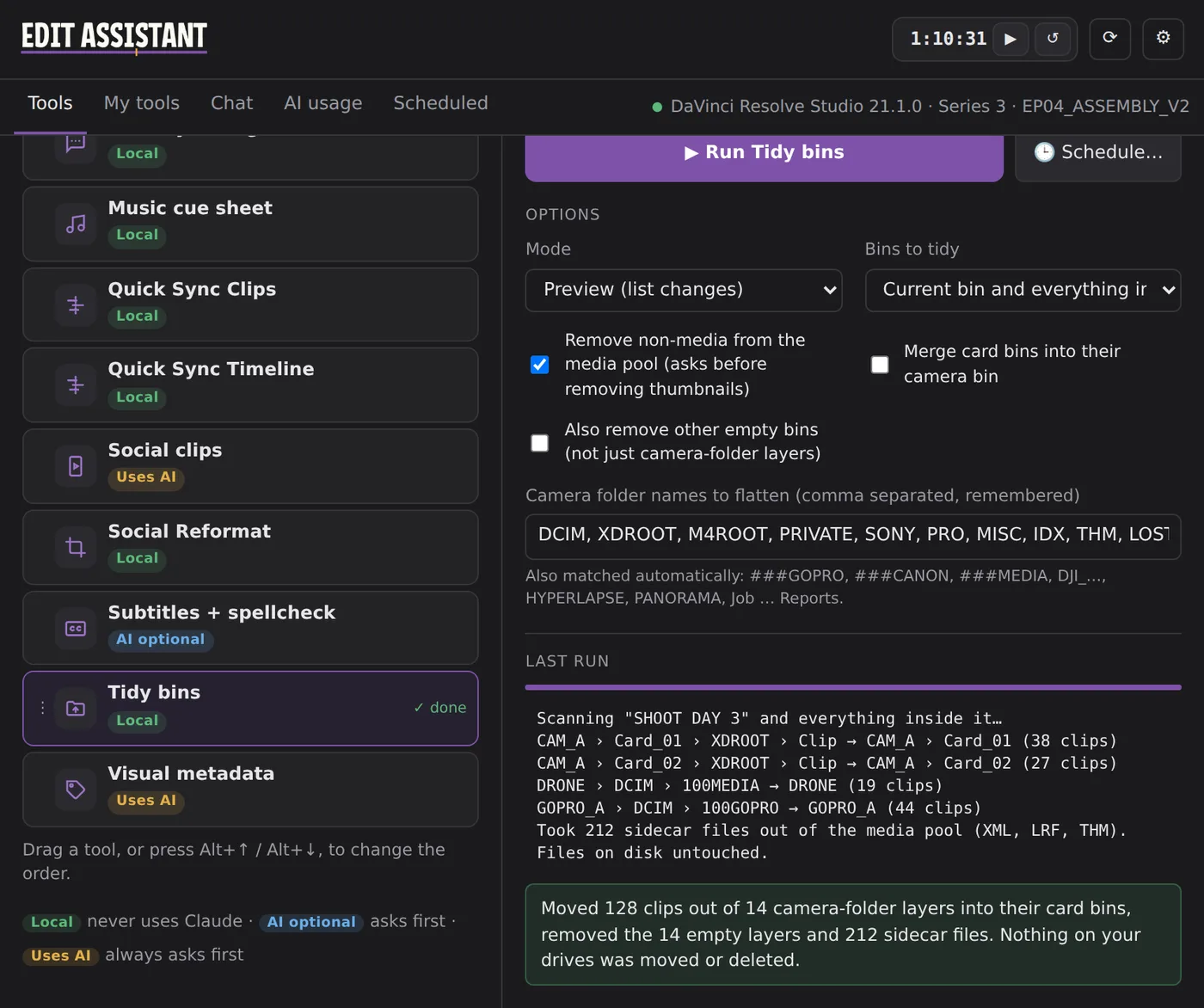
The Edit Assistant panel in Resolve, showing Tidy bins after flattening camera-card folders into clean card bins.
Built by an editor

For the jobs nobody wants to do by hand

Made for broadcast, documentary and online editors who spend too much of the day on housekeeping, syncing and paperwork.

Tidy bins

Card dumps, cleaned up in seconds

Every camera writes its own maze of folders. Tidy bins pulls the media up into your card or camera bins, removes the empty layers and takes sidecar files out of the media pool.

CAM_A › Card_01 › XDROOT › Clip → CAM_A
  • Knows Sony, Canon, GoPro, DJI and drone layouts
  • Merges cards only when they're from the same camera, by serial number
Tidy bins result: clips moved into card bins and sidecar files removed.
Quick Sync

Multicam shoots, synced by timecode

Quick Sync Timeline makes a synced copy of your timeline: one video track per camera, each with its own audio, every clip placed by timecode. In Auto mode Resolve's waveform match corrects any camera whose clock drifted.

  • Works whether clips are stacked or dumped in a row
  • Quick Sync Clips syncs just a selection, in place
  • Every clip checked, and anything that didn't land is listed in red
V2 CAM_B · FX6 ▮▮▮▯▮▮▮▮▯▮▮
V1 CAM_A · FX9 ▮▮▮▮▮▯▮▮▮▮▮▮
A1–A8 CAM_A audio
A9–A16 CAM_B audio
✓ 20 clips placed · offsets measured per camera
Cue sheets

Broadcast paperwork, straight from the timeline

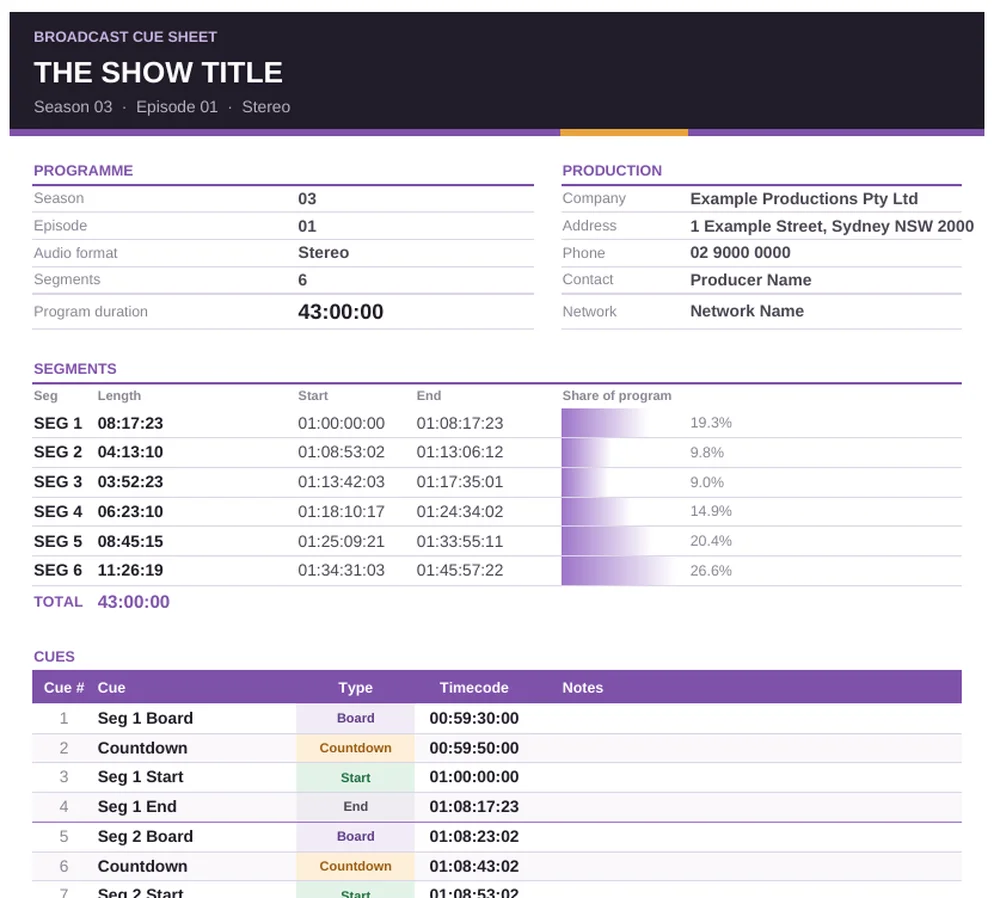
The Cue Sheet tool reads your boards, countdowns and segments and writes a finished spreadsheet with frame-accurate timecodes. The Music Cue Sheet tool lists every piece of music, including inside nested segment timelines, laid out for APRA AMCOS.

  • Segment durations and program total, checked
  • Never overwrites an earlier sheet
A cue sheet made by Edit Assistant, with programme details, segment lengths and cue timecodes.
Schedule and your own tools

Run it tonight. Keep what works.

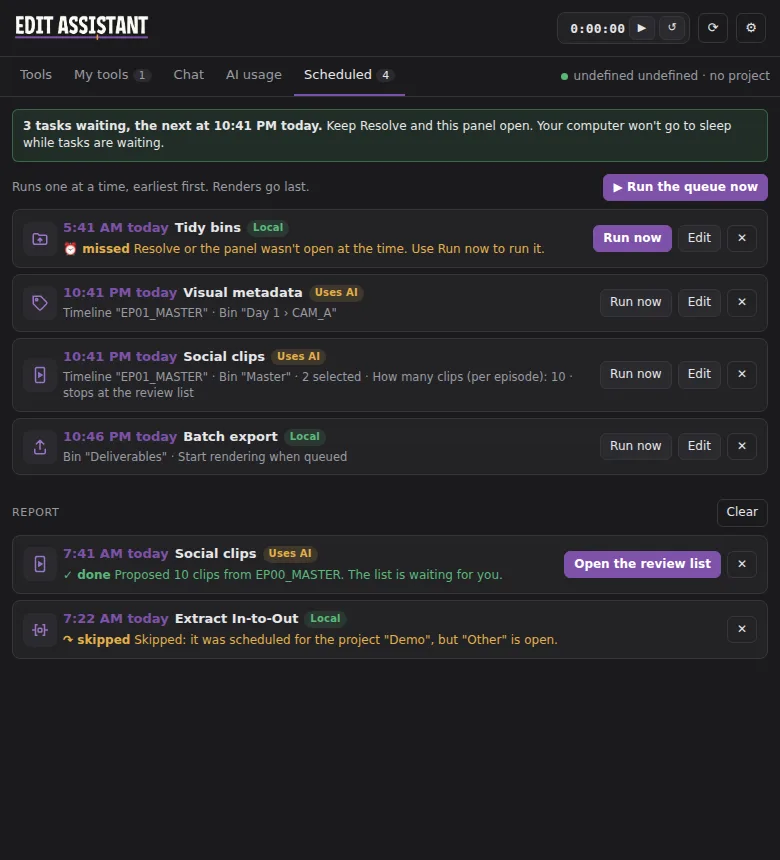
Schedule any tool for later, like renders and heavy jobs at the end of the day, with its questions answered up front. Check the report in the morning. Scripts you make with Claude in the chat can be saved as your own tools and run with one click.

The Scheduled tab: tasks waiting to run tonight and a report of what ran.
Every tool

Thirteen tools today, more every update

Updates arrive by themselves. Nothing changes while you're working.

Tidy bins Local

Flattens camera-card folders into clean card and camera bins.

Quick Sync Timeline Local

A synced copy of your timeline, one track per camera.

Quick Sync Clips Local

Syncs just the clips you select, on new tracks in place.

Cue sheet AI optional

Broadcast cue sheet with boards, countdowns and segment timecodes.

Music cue sheet Local

Every music cue, including inside nested segments, for APRA AMCOS.

Extract In-to-Out Local

The section between your marks as its own timeline, grades and all.

Batch export Local

Queues every selected timeline with your preset, and checks the queue.

Clean up dialogue AI optional

Finds silences, ums and false starts. Preview, then build a clean copy.

Identify Dialogue Local

Colours every clip with no speech, so the talking stands out.

Subtitles + spellcheck AI optional

Resolve's subtitles, proofread with your names list, as an SRT.

Social clips Uses AI

Finds short clips in finished episodes and builds each as a vertical timeline.

Social Reformat Local

1:1, 9x16 and 4:5 versions of your timelines, ready to reframe.

Visual metadata Uses AI

Keywords and a one-line description written into every clip.

Local never uses Claude AI optional has an optional Claude step Uses AI needs Claude, and asks first
Claude, on your terms

AI where it helps. Never behind your back.

A handful of tools and the Chat tab use Claude, Anthropic's AI. You connect your own Claude plan or API key, so there are no credits, no daily limits and no extra AI fees from us.

It asks first, every timeBefore any tool sends anything to Claude, you see what and why, and choose.
Everything is loggedThe AI usage tab lists every request, allowed or not.
Only what's neededTranscript text and small still frames, never your media files.
Chat with your projectAsk about your timeline in plain English. Claude asks before it changes anything.
Pricing

Buy it once. No subscription.

Free while it's in beta. At launch it's a one-time purchase with every update to that version included. Beta testers get the founding price.

Small User
US$149US$99 founding price
Up to 3 machines
Business User
At launch
Up to 10 machines
Enterprise User
At launch
Up to 100 machines

Every tier gets every tool. The only difference is how many machines a licence covers.

FAQ

Good questions

What do I need?
DaVinci Resolve Studio 21.1 or later on Windows or Mac, with Preferences › System › General › External scripting set to Local.
Does it work with the free version of Resolve?
No. Workflow Integration panels need Resolve Studio.
Do I need Claude?
No. Most tools run entirely on your computer. Claude is only for the chat and the tools marked AI optional or Uses AI.
Can it damage my project?
Files on your drives are never moved or deleted, edits go to new timelines, and most tools preview first. Test on a copy of anything precious, as with any new tool.
How do updates work?
They download in the background and are used the next time you open the panel. Every update is signed and checked, and you can go back a version from Settings.
How do I join the beta?
Add your name to the waiting list. Invites go out in small batches with a personal download link.

Get the slow jobs off your plate.

Join the beta, try it on your next project and tell us what to build next.

Join the beta